
ChatGPT prompts for sales emails enable faster, more personalized outreach. When combined with HubSpot Smart CRM data, sales teams generate context-rich messages for every stage of the funnel.
![Download Now: 100 ChatGPT Prompts for Marketers [Free Guide]](https://no-cache.hubspot.com/cta/default/53/c497a8fe-0f60-4244-9cb1-5bed4d1e5ab6.png)
AI transforms email creation from a manual process into an automated workflow grounded in customer data. When Smart CRM information, like role, deal stage, or last activity, feeds into a prompt, the result is a message that matches each contact’s priorities and timeline. Every send feels personal because it’s informed by real behavior.
HubSpot brings this workflow into one space. The ChatGPT Connector lets teams generate and refine prompts directly within HubSpot, using CRM data to shape tone and content. The AI Email Writer then builds and tracks message performance. Together, these tools help teams deliver emails that feel human and move deals forward.
Table of Contents
- How to Add CRM Context to Your ChatGPT Sales-Email Prompts
- Best ChatGPT Prompts for Cold Sales Emails
- ChatGPT Prompts for Follow-Up Sales Emails
- ChatGPT Prompts to Handle Common Sales Objections
- ChatGPT Prompts to Re-Engage Prospects
- ChatGPT Prompts for Warm Email Outreach
- ChatGPT Prompts for Email Referrals
- How to Operationalize ChatGPT Sales-Email Prompts in HubSpot
- AI Prompts for Sales Emails: Best Practices and Governance
- Frequently Asked Questions About Sales-Email Prompts
How to Add CRM Context to Your ChatGPT Sales-Email Prompts
CRM data improves AI-generated email personalization by supplying role, deal stage, engagement history, and objections. Prompts made with this data match timing and intent.
Strong prompts start with clear details about who the message is for and what it needs to achieve. Including these elements creates targeted outputs that sound natural and drive responses.
- Role: Sets tone and authority. A clear role helps ChatGPT match the voice of a professional sales rep rather than a generic sender.
- Audience: Aligns with buyer persona. Specifying the recipient (e.g., a growth-focused decision-maker or operations lead) tailors content to real motivations.
- Objective: Clarifies desired action (book a demo, confirm a meeting) so the AI writes with purpose.
- CRM properties: Inserts live context such as deal stage, last activity, recent content viewed, or key objections.
- Constraints: Defines word count or format to keep messages concise and scannable.
- Tone: Guides style (confident, helpful, professional).
- CTA: Directs to the next step.
Using CRM data in every prompt turns ChatGPT from a writing assistant into an extension of the sales process. Every email AI makes is grounded in facts, aligned with the funnel, and designed to convert.
Best ChatGPT Prompts for Cold Sales Emails
Short, single-outcome prompts that pull role, pain, and last activity from Smart CRM earn replies faster than generic outreach.
Cold outreach works when messages sound relevant and respectful of time. The goal is a short, personalized email that introduces value without overwhelming the reader. ChatGPT prompts balance personalization and brevity by combining CRM insights with focused intent, so every line supports a response.
Each example below is structured for quick adaptation. Sales teams can copy, paste, and edit prompts inside HubSpot’s ChatGPT Connector. From there, they can generate new variations for different industries or personas.
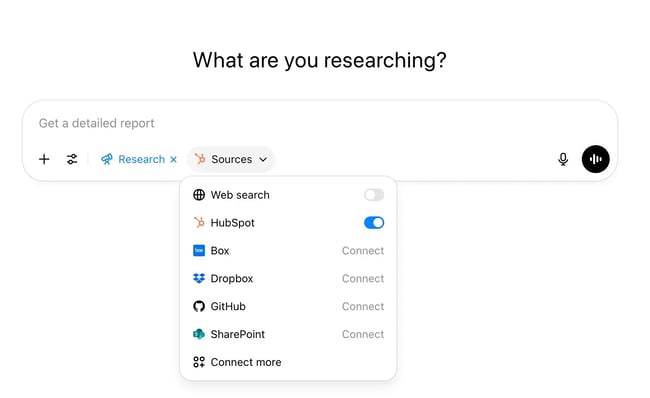
Personalization at Scale Using LinkedIn Profile
Use this when: You’re targeting a decision-maker on LinkedIn and want hyper-relevance without spending 15 minutes on each message.
Prompt
Based on this LinkedIn profile: [PASTE LINKEDIN URL], write a first-touch cold email in under 90 words. Focus on a pain point that aligns with their recent role, company initiatives, or thought leadership. The tone should be curious, friendly, and focused on value, not features. Mention a potential blind spot or missed opportunity, and include a soft CTA like “Worth a chat?”
Why it works: It anchors the message in who they are and what they care about, which dramatically increases open and reply rates, especially for C-level and VP personas.
Event-Triggered Email Based on News or Initiatives
Use this when: A company just announced funding, product launch, event participation, or any change.
Prompt
A company just announced [e.g., $20M Series A round OR a new AI product launch OR an upcoming event]. Write a cold email from a strategic sales consultant offering to help them [drive pipeline, monetize, scale reach, de-risk decisions — adapt to the situation]. The message should be short, buyer-centric, and create urgency without sounding pushy. Include a credibility anchor from past work (e.g., “we’ve helped similar AI teams like X or Y”).
Why it works: Event triggers spark momentum. This prompt rides that wave with relevance and proof, positioning you as a partner, not a peddler.
Problem-First Messaging Based on Industry Trends
Use this when: You’re reaching out based on shared industry challenges (e.g., data reliability, AI security, event ROI).
Prompt
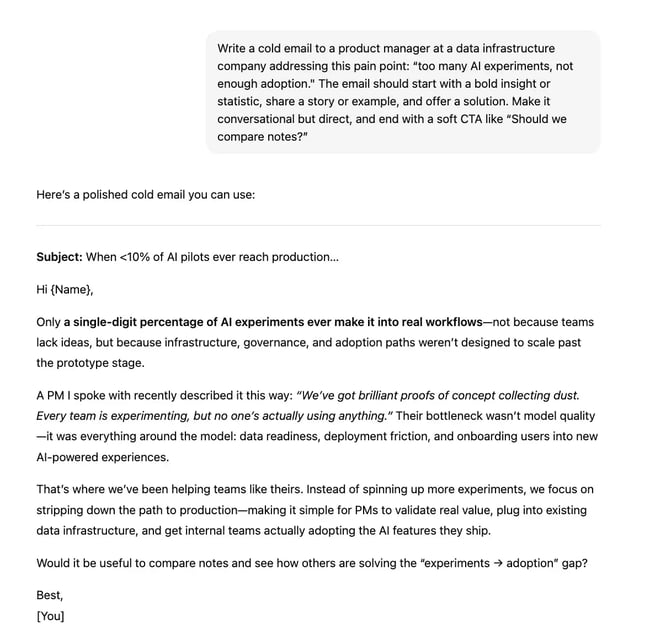
Write a cold email to a [TITLE] at a [TYPE OF COMPANY, e.g., AI startup, data infrastructure company] addressing this pain point: [INSERT PROBLEM, e.g., “too many AI experiments, not enough adoption” or “events that burn budget without delivering SQLs”]. The email should start with a bold insight or statistic, share a story or example, and offer a solution. Make it conversational but direct, and end with a soft CTA like “Should we compare notes?”
Why it works: Problem-first emails resonate because they speak the buyer’s language. You’re showing you understand their world, not just your product.
Follow-Up Email When Prospect Went Cold
Use this when: You’ve already reached out and had no reply.
Prompt
Write a follow-up cold email for a [job title] who hasn’t responded to a previous message about [TOPIC]. The tone should be respectful and upbeat, reminding them of the original value offered, reframing the pain point in a new way, and asking if it still makes sense to chat. Keep it under 70 words and use a curiosity-based subject line.
Why it works: Follow-ups are where most meetings get booked. This prompt gives you a way to reframe without nagging and tap into their curiosity or FOMO.
Offer-Based Cold Email with Social Proof
Use this when: You have a strong offer (like a free resource, consultation, or sponsorship deal).
Prompt
Write a cold email offering [insert offer: free audit, special sponsorship package, data sample, etc.] to a [job title] at [company type]. Mention how similar companies like [X or Y] saw [RESULT], and frame the offer as low-risk, high-upside. Use two short paragraphs max, with a clear CTA to schedule a quick call. Make it easy for the reader to say yes.
Why it works: Offers + social proof = conversion. This prompt helps you frame your offer as a strategic gift, not a sales pitch.
ChatGPT Prompts for Follow-Up Sales Emails
Day 2 and Day 5 follow-ups should reference engagement data and progress toward a clear next step. See HubSpot’s follow-up templates for additional examples.
Follow-ups sustain momentum. Timing and relevance matter. Each touchpoint should offer value and reinforce trust. Using ChatGPT prompts connected to HubSpot Smart CRM helps adapt tone and message type based on deal stage and engagement history.
Day-2 Prompts
The Short Bump
Use this when: You want to create a natural and low-pressure experience. The message is brief and designed to check in with the prospect, so you’re not overloading them with information.
Prompt
Write a very short follow-up email to a [job title] who hasn’t replied to my cold email sent 2 days ago. Just check if the message got buried. Keep it casual, friendly, and under 40 words. Subject line: “Quick nudge.”
The Value Add
Use this when: You want to demonstrate knowledge about the prospect’s pain point. You may also have a new report or trend that’s relevant to the potential buyer. The message positions the rep as a guide and source of knowledge throughout the sales process.
Prompt
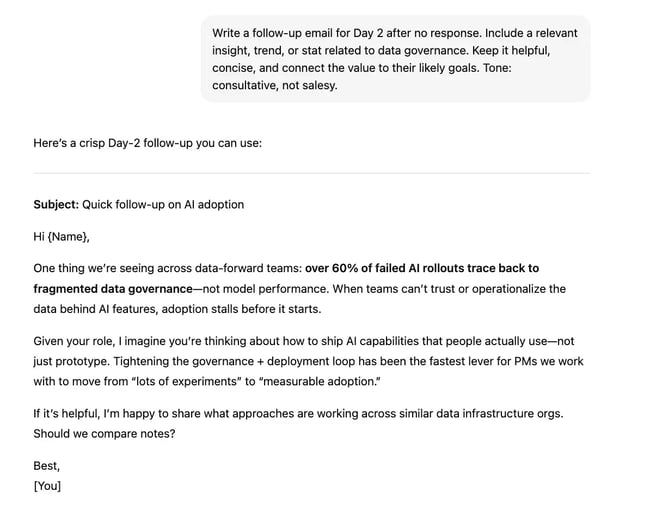
Write a follow-up email for Day 2 after no response. Include a relevant insight, trend, or stat related to [insert topic, e.g., event ROI, data governance, AI adoption]. Keep it helpful, concise, and connect the value to their likely goals. Tone: consultative, not salesy.
Ask for a Next Step
Use this when: You want to move the prospect into the next stage. A rep can craft this type of message when they know exactly what the next step in the sales process should be.
Prompt
Draft a polite follow-up for Day 2 that re-frames my original ask (e.g., “quick chat to explore X”) in simpler terms. Include 1-2 benefits of the meeting, suggest a time link, and keep it buyer-focused. Goal: Get them to take the next step.
Day-5 Prompt
The Short Bump
Use this when: You need a quick check-in, but you’re worried about losing the prospect if you’re too pushy.
Prompt
Write a casual Day‑5 follow-up email to someone who still hasn’t replied. Just ask if they’re open to the idea or if I should circle back later. Use a light tone, under 45 words. Optional subject: “Still relevant?”
The Value Add
Use this when: You have a specific resource that you want to get in front of a process. The resource should relate specifically to a challenge the team faces. Sales enablement content positions the brand as a relevant solution for the buyer.
Prompt
Draft a Day‑5 follow-up with a fresh value-add: link to a case study, webinar, playbook, or stat relevant to [insert pain point]. Show how this helps people in [their industry], and keep the message under 90 words. CTA: “Worth taking a look?”
Ask for a Next Step
Use this when: You’ve identified that the product can solve the business’ problems, but you’re not sure what the blockers might be. The message can help surface key decision-makers or identify reasons the prospect has to wait to make a purchase.
Prompt
Write a Day‑5 follow-up with a direct ask for a 15-min call. Mention you’ve reached out before, recap one sentence of value, and ask if there’s a better person or time. Tone: direct but respectful, and add a scheduling link.

ChatGPT Prompts to Handle Common Sales Objections
Objections indicate evaluation. ChatGPT can help craft clear replies that address the concern and move the conversation forward. With HubSpot Smart CRM, prompts can pull prior objections, pricing notes, and deal data to tailor the message.
Objection responses should be empathetic, specific, and anchored in proof. For discovery technique ideas, see the questions great sellers ask.
Objection: “The price is too high” or “It’s not in the budget”
Prompt
A [job title] just said our pricing is too high or that the budget is tight right now. Write a response that empathizes with the concern, reframes the cost as an investment, and anchors it to ROI or a costly pain they already face. The tone should be collaborative, not defensive. Offer to walk through options or tailor a plan if helpful.
Why this works: This objection often surfaces early, but it’s rarely the real issue. Price is a proxy for value. When you calmly acknowledge their concern and shift the conversation from cost to outcomes.
Offering to co-create options also shifts the power dynamic: instead of “selling at them,” you’re building with them, which disarms defensiveness and triggers collaboration.
Objection: “Now’s not a good time”
Prompt
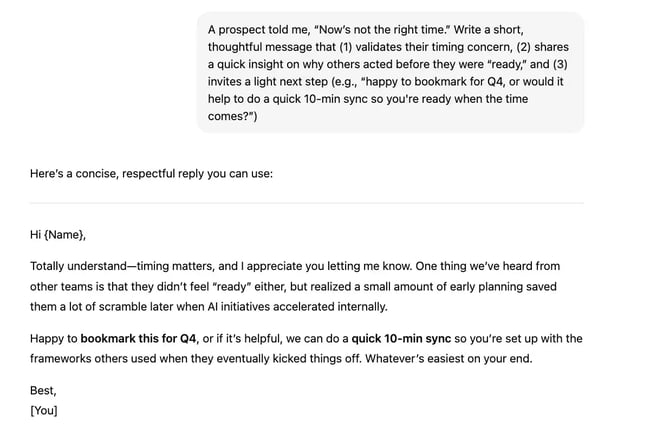
A prospect told me, “Now’s not the right time.” Write a short, thoughtful message that (1) validates their timing concern, (2) shares a quick insight on why others acted before they were “ready,” and (3) invites a light next step (e.g., “happy to bookmark for Q4, or would it help to do a quick 10-min sync so you’re ready when the time comes?”)
Why this works: The “timing” objection is really about perceived risk or energy. Buyers worry that taking a meeting now will cost time, open a can of worms, or require commitment.
When you respect their timing and still stay in motion, you bypass the stall. By gently sharing a story of another client who acted early and won, you invite them to reframe “not now” as “maybe it’s worth a quick peek.”
Offering to help them prep now for later puts you in the trusted advisor role, not a quota-hungry seller.
Objection: “We’re good for now” or “We’re all set”
Prompt
A lead told me they’re happy with their current setup and not looking to change anything. Write a reply that respects their position but gently challenges the status quo with a question or insight. Use a tone that’s curious, not combative. Mention how similar teams thought they were fine until [X insight or pain emerged].
Why this works: This objection is a comfort signal, not a buying signal. Most buyers default to inertia, even when problems exist. If you respond with aggression or feature-dumping, they retreat further.
What works here is curiosity plus insight. Asking a non-threatening question like, “Have you noticed X creep over time?” introduces productive friction.
When you show how other teams thought they were “set” until a blind spot appeared, you subtly inject doubt into their certainty in a way that feels respectful and useful.
Objection: “We already use a competitor”
Prompt
The prospect said they already use [insert competitor]. Write a respectful, curiosity-driven response that avoids trash-talking and instead positions us as a complementary or differentiated option. Include a gentle question to explore how it’s going, what gaps might still exist, or how we’ve helped others alongside or after that tool.
Why this works: Most reps immediately go into “us vs. them” mode, but that creates tension and defensiveness. The more strategic approach is to normalize tool diversity. When you position your solution as either a booster or a differentiated fit, you re-enter the conversation through a side door.
Framing your ask around “how’s it going with X?” or “what would make that setup even better?” leads them to uncover their own dissatisfaction, which is far more powerful than telling them directly.
Objection: Security, compliance, or legal blockers
Prompt
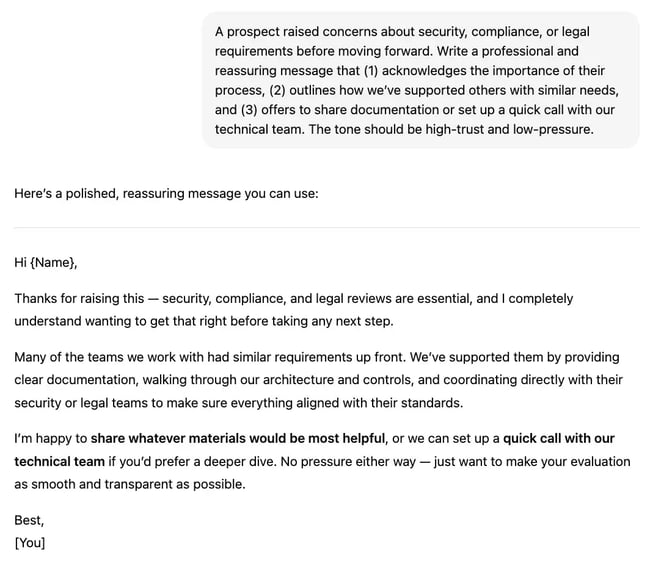
A prospect raised concerns about security, compliance, or legal requirements before moving forward. Write a professional and reassuring message that (1) acknowledges the importance of their process, (2) outlines how we’ve supported others with similar needs, and (3) offers to share documentation or set up a quick call with our technical team. The tone should be high-trust and low-pressure.
Why this works: Security and compliance are risk gatekeepers, especially in regulated or enterprise environments. If you react defensively or seem unsure, you trigger vendor disqualification mode. But when you calmly acknowledge their process and immediately offer relevant proof, you signal maturity and readiness.
Most reps avoid this conversation, but leaning in with clarity, confidence, and team alignment makes you stand out.
ChatGPT Prompts to Re-Engage Prospects
Re-engagement works best with a polite nudge, a new value hook, or a respectful close-the-loop. Re-engagement emails revive conversations that went quiet. The right prompt uses CRM context — like last touch date, deal stage, or prior objection — to generate messages that feel thoughtful rather than repetitive.
Polite Nudge Prompt
Prompt
A [job title] from [company] showed interest but hasn’t responded in 2+ weeks. Write a short, polite nudge email that reopens the conversation without pressure. Mention that I know things get busy, lightly recap the original value, and end with a simple CTA like “Still worth exploring?” or “Happy to revisit if timing makes sense.” Tone: warm, respectful, low-pressure.
Why this works: It acknowledges reality without guilt-tripping. You’re not chasing. You’re calmly inviting realignment. The soft CTA lets them re-engage on their terms.
This message is great for prospects who ghosted after a few touchpoints or showed interest but went quiet.
Value-Forward, Re-Open Prompt
Prompt
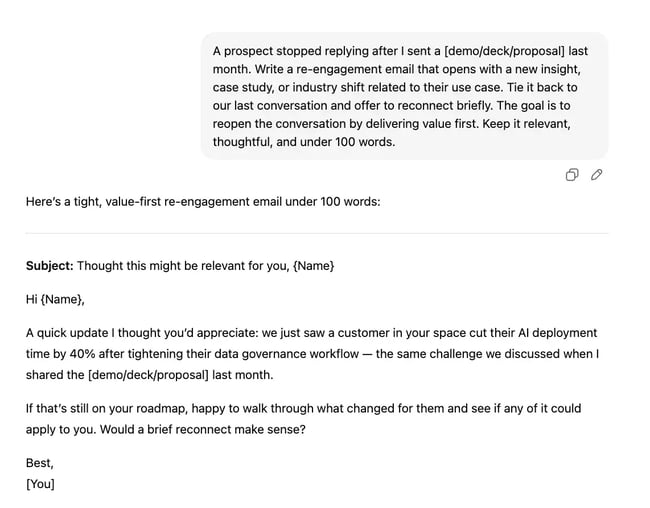
A prospect stopped replying after I sent a [demo/deck/proposal] last month. Write a re-engagement email that opens with a new insight, case study, or industry shift related to their use case. Tie it back to our last conversation and offer to reconnect briefly. The goal is to reopen the conversation by delivering value first. Keep it relevant, thoughtful, and under 100 words.
Why this works: When value leads, you earn attention back. This feels less like “chasing” and more like “continuing the conversation.” That’s especially powerful if the insight makes them rethink the status quo.
This message works best for leads that went dark after receiving a deck, call, or demo — and you want to re-engage with new relevance.
“Permission to Close the Loop” Prompt
Prompt
A sales lead hasn’t replied to several follow-ups. Write a short, respectful “permission to close the loop” message. Let them know it’s totally okay if priorities have shifted, and ask if I should close the file or check back in a few months. Tone: empathetic, confident, and non-needy. CTA: reply yes/no, or suggest a future window. Optional subject line: “Should I close the loop?”
Why this works: This flips the power dynamic. You take the pressure off, preserve dignity, and actually increase reply rates. People feel respected, not cornered. It also gives you a clean exit or re-entry path.
This approach is great for leads that have gone fully silent, and you want closure respectfully and with integrity.
ChatGPT Prompts for Warm Email Outreach
Warm prompts should reference the last touch (event, content, or form) and map to a single, low-friction next step. Warm outreach connects with leads who are already engaged. These prospects may include webinar attendees, content downloaders, or inbound demo requests.
The prompts below help ChatGPT write contextual follow-ups that respect prior interaction.
Warm Introduction Email Prompt
Prompt
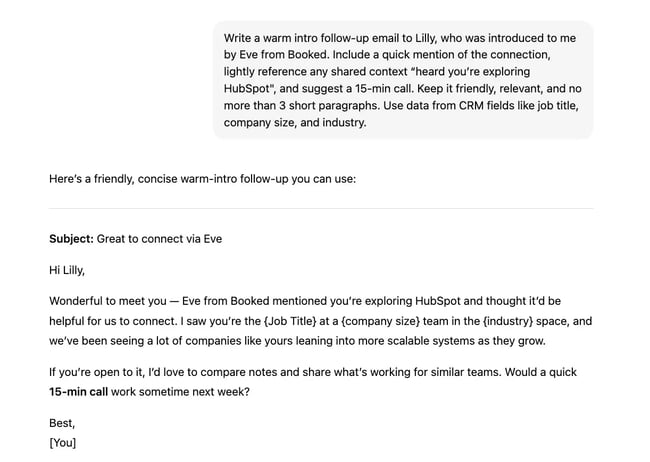
Write a warm intro follow-up email to [Name], who was introduced to me by [Referral Name] from [Company]. Include a quick mention of the connection, lightly reference any shared context (e.g., “heard you’re exploring X,” “Y thought we should connect”), and suggest a 15-minute call. Keep it friendly, relevant, and no more than three short paragraphs. Use data from CRM fields like job title, company size, and industry.
Why this works: The message anchors on social proof, shows you’ve done your homework, and invites them into a low-friction next step. No cold pitch needed. This prompt works well when a mutual connection referred or intro-ed you (e.g., via email thread, Slack, or LinkedIn).
Webinar Attendee Follow-Up Prompt
Prompt
Write a follow-up email to [First Name], who attended our recent webinar titled “[Webinar Title]” on [Topic]. Mention one key takeaway or stat from the session, then ask if they’d like to dive deeper into how we can apply it to [CRM industry field or use case]. Use CRM fields to personalize by company, job title, and webinar engagement level (e.g., Q&A participant, viewer duration). CTA: offer a 15-minute brainstorm call or tailored resource.
Why this works: The rep transitions from education to exploration. Instead of treating the webinar like a one-off, you’re using it as the start of a personalized sales journey.
Content Download Re-Engagement Prompt
Prompt
Write a warm follow-up to [First Name], who downloaded our [Resource Name] on [Topic] last week. Reference the download naturally, then ask if it sparked any questions or if they’d like to see how it applies to their team at [Company Name]. Pull in relevant CRM info like job title, pain point field, or deal stage. Keep tone helpful and curious, not salesy. End with a soft CTA: “Want to explore this live?”
Why this works: Buyers who download content are signaling intent. This prompt treats them as informed, invites conversation, and respects their digital body language. The message works for leads who downloaded a whitepaper, case study, or PDF from your site or email.
Inbound Demo Request Prompt
Prompt
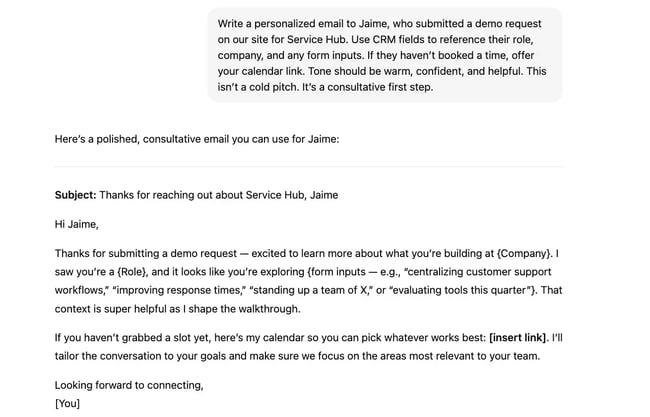
Write a personalized email to [First Name], who submitted a demo request on our site for [Product/Service Name]. Use CRM fields to reference their role, company, and any form inputs (e.g., “team of 5,” “looking to scale outbound,” “timeline = this quarter”). If they haven’t booked a time, offer your calendar link. Tone should be warm, confident, and helpful. This isn’t a cold pitch. It’s a consultative first step.
Why this works: The prospect already raised their hand. This message meets them where they are with speed, context, and clarity. The message makes it easy to keep the momentum going.
ChatGPT Prompts for Email Referrals
Referral emails should acknowledge the mutual connection, state value quickly, and invite a short call. The goal of these messages is to connect new prospects through a shared contact. They should sound grateful, clear, and confident, recognizing the referrer while focusing on value for the new lead.
Each of these prompt types helps sales reps reconnect, reframe, or reach out with context that matters. When ChatGPT and HubSpot Smart CRM work together, every email feels timely, specific, and worth opening.
Prompt to Ask for a Referral (No Response Yet)
Prompt
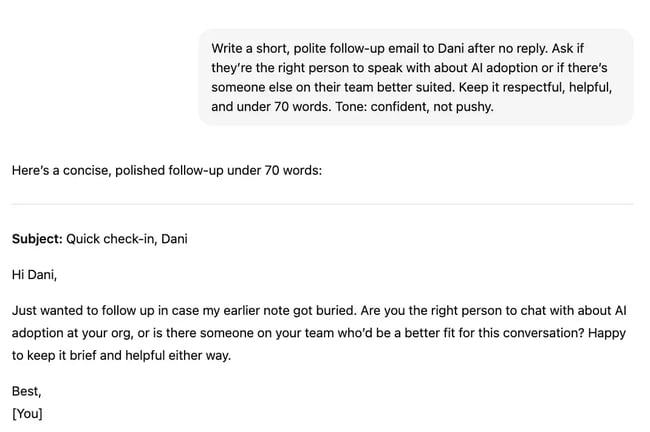
Write a short, polite follow-up email to [First Name] after no reply. Ask if they’re the right person to speak with about [Topic/Offering], or if there’s someone else on their team better suited. Keep it respectful, helpful, and under 70 words. Tone: confident, not pushy.
Why it works: This removes pressure and opens the referral path organically. You’re not giving up — you’re repositioning. Use this message when someone didn’t reply, and you want to ask who might be the right contact instead of pushing.
Prompt to Request a Warm Intro from a Mutual Contact
Prompt
Write a professional and friendly email asking [Mutual Contact] if they’d be open to making a warm introduction to [Prospect Name] at [Company], who’s in [Job Title] or [CRM vertical]. Briefly explain why the intro could be valuable to them, and make it easy by including a 1-2 line blurb they can forward. Keep tone gracious and low-lift.
Why it works: The message is easy to say yes to, shows social alignment, and gives the contact everything they need without making them work for it. Use this prompt when someone knows the target prospect, and the rep is asking for a referral.
Prompt to Follow Up After Being Referred
Prompt
Write an email to [New Prospect Name] letting them know I was referred by [Referrer Name] from [Company]. Start with the referral mention, then explain why I’m reaching out (based on shared goals or pain point), and suggest a quick 15-minute sync. Use a warm, professional tone and keep it under 120 words.
Why it works: The referral gives instant trust. This prompt uses it to open with relevance, not just “So-and-so told me to.” Try this message when someone referred you to a colleague, and you’re reaching out cold with context.
Prompt to Turn a No Into a Referral Ask
Prompt
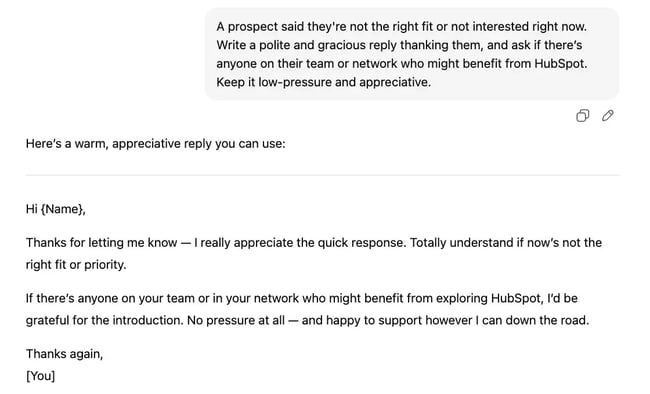
A prospect said they’re not the right fit or not interested right now. Write a polite and gracious reply thanking them, and ask if there’s anyone on their team or network who might benefit from [insert short version of your solution]. Keep it low-pressure and appreciative.
Why it works: You turn rejection into redirection. Most reps walk away after a no. You stay top-of-mind by asking for a helpful connection.
Prompt to Add a Referral CTA in an Email Signature or PS Line
Prompt
Write a one-liner I can use in my email signature or as a PS in outreach that politely invites referrals. Tone should be friendly and subtle, like: “Not the right person? Always appreciate a point in the right direction.” Generate three versions.
Why it works: It plants the seed without being awkward. Over time, this converts passive readers into active referral sources, especially on CC chains or LinkedIn follow-ups.
How to Operationalize ChatGPT Sales-Email Prompts in HubSpot
To get started with AI email prompts, reps can enable the ChatGPT Connector in HubSpot. Teams can then create templates with tokens and place them in Sequences. Once email data is in, teams can iterate with AI Email Writer and A/B reports. Consider testing subject lines.
1. Connect HubSpot and ChatGPT via the Connector. Authenticate the ChatGPT Connector so prompts can reference HubSpot’s Smart CRM fields and recent activity.
2. Save prompts as templates inside HubSpot; tag by funnel stage. Create a shared library for sales development representatives, account executives, and account managers. Tags different templates by the type of email and use case. Tages may include “cold,” “day-2,” “post-demo,” and “renewal.”
3. Insert personalization tokens (name, company, lifecycle stage).HubSpot Sequences can be used to insert personalization tokens based on the prospect’s role, industry, last activity, and known objections. That personalization can increase message relevance without extra manual work.
4. Add to sequences to automate follow-ups.
Teams can use sequences in HubSpot to automate the follow-up process. Strategically decide what templates match with different steps in the sales process and delays. Triggers send based on behavioral signals and personalize with info from deal records for clean attribution.
5. Use AI Email Writer to generate variants.
HubSpot’s AI email writer can create personal email variants. The tool can generate subject lines and messaging options to meet every occasion. Once emails are sent, be sure to store sends, opens, clicks, and replies in HubSpot’s CRM.
6. A/B test and iterate — optimize tone, CTA, and timing.
Just sending emails isn’t enough. Teams should use HubSpot to see how each message performs, allowing for tweaks in the larger email strategy. Ship two controlled variants, review sequence reports, and roll forward the winner. Repeat for each stage.
What Tokens to Use for Which Types of Emails
|
Stage |
Prompt inputs (tokens) |
Sequence step |
Primary KPI |
|
Cold |
role, industry, pain, last activity |
Step 1 email |
Reply rate |
|
Day-5 value |
pain, content title, last activity |
Step 2 email |
Click rate |
|
After-value ask |
content viewed, role, CTA |
Step 3 email |
Meetings booked |
|
Re-engage |
last touch date, objection |
Step 4 email |
Replied/reopened |
AI Prompts for Sales Emails: Best Practices and Governance
Prompt discipline and human oversight keep AI emails accurate, safe, and brand-aligned. Here are the best practices reps can use when crafting sales email prompts.
- Define clear roles, objectives, and tone. Lead each prompt with who is writing, who is reading, and what action is needed. Specify tone in a single descriptor. Adjectives like confident and helpful work well here.
- Ground prompts in CRM fields. Reference the deal stage, last activity, and recent engagement so outputs match timing and intent. Use dynamic tokens for the deal stage, last activity, and known objections.
- Control tone and structure. Constrain length and format to increase clarity and response rates. Subject lines should be less than 55 characters. Body text should be around 125 words or fewer and have plain, conversational language.
- Review before sending. Add a quick human quality pass to validate facts, links, names, and claims. Remove generic filler and vendor-speak.
- Refresh quarterly. Retire underperforming prompts and update language as messaging, market conditions, or product capabilities evolve.
Frequently Asked Questions About Sales-Email Prompts
Can I safely use ChatGPT with customer data?
Yes, sales teams can use the HubSpot ChatGPT Connector and keep data secure. Data handling and retention also depend on the selected ChatGPT plan/settings. Admins control the connection and can audit usage.
How do I stop AI emails from sounding robotic?
Add human phrasing and situational context to every prompt. Constrain tone and length, then use HubSpot’s AI Email Writer variants to select the most natural option.
What is the best way to A/B test AI-written emails?
Use HubSpot Sales Hub Sequences to manage and track test results by variant and stage. Monitor open, click-through, and reply rates; iterate inside the same workflow.
How often should I refresh prompts?
Review and refresh every 90 days or whenever win rates or buyer behavior shift.
Should I use the same prompt for every persona?
Do not use the same prompt for every persona. Adapt prompt inputs to each ICP’s challenges and communication style. Personalization tokens insert dynamic CRM fields to reflect what the contact values most.
Moving From Prompts to Performance
CRM-aware prompts, the ChatGPT Connector, and AI Email Writer work together to make personalized outreach scalable. Each message draws on real Smart CRM context, so reps spend less time drafting and more time selling.
HubSpot brings it all together — unified data, fast AI-assisted content creation, and a human-in-the-loop workflow. This workflow keeps every email accurate, relevant, and authentic.

